Amazon’s 3D Phone may have a stereoscopic lenticular display

It’s not clear whether the phone has stereoscopic 3D or not: Amazon’s Smartphone Is Coming on June 18 with 3D Effects | Digital Trends.

Update: I doubt it has a lenticular display. The online video makes it look more like it is using 3D perspective effects typical of a video game, but in a good way. Its sort of like the well known 3D “wiggle” effect used for 3D still photos, except here, the “wiggle” is generated at 60 fps by tilting the phone and is under the control of the user.


But that description implies it uses head (eye) tracking to dynamically create appropriate 3D imagery and positioning through a stereoscopic lenticular glasses free display. It says its similar to the Nintendo 3DS display, which did use a lenticular glasses free display.

However, I heard no mention of a glasses free display (may be those are bad words). In fact, Amazon seemed to prefer “dynamic perspective” to saying 3D, as if the word “3D” is poison.

If it does have this ability, then it can likely play Youtube 3D videos and other 3D content on its 4.7 inch display.

Update: Some of the media in advance of the announcement, and after the announcement, are calling this a “holographic” display. It is not holographic. I stop reading when I see someone use that word to describe a stereoscopic display – they are very different technologies.

Amazon Fire Phone page is now live on Amazon.com

http://www.amazon.com/Amazon-Fire-Phone-32GB-AT/dp/B00EOE0WKQ/ref=sr_tr_1?ie=UTF8&qid=1403117587&sr=8-1&keywords=amazon+phone

Also the Fire Phone features optical image stabilization and a global shutter in its 13 MP camera. I believe only the Nokia Lumia offers image stabilization features (and has up to a 41 MP camera for various effects).


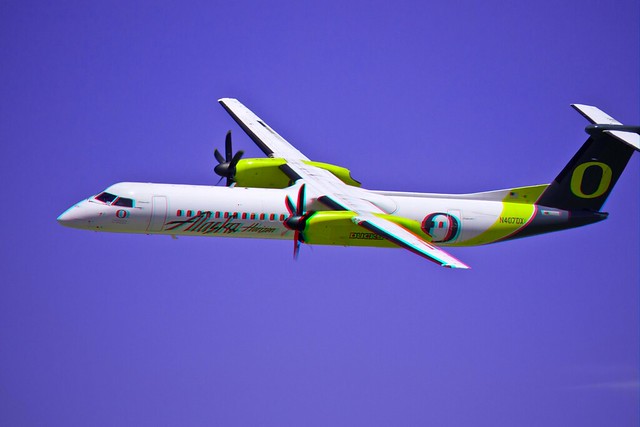
Alaska Airlines flight in 3D

Horizon Air flies Bombardier’sde Havilland Dash 8 Series Q400 70 passenger turbo props for Alaska’s shorter routes. This photo was taken at the Oregon International Air Show in the summer of 2013, as a conventional 2D photograph. I converted it to 3D by creating a depth map using StPaint Plus.

Click either image to see the full size version on Flickr. Be sure to subscribe to my Flickr photostream as I am now adding photos every week.

Alaska Air, in 3D, red/cyan anaglyp

Alasak Air, in 3D, in crosseyed formatAlaska/Horizon have painted one aircraft with the logo and colors of each college/university for the towns they fly too. They fly to Eugene, OR, home of the University of Oregon – and this is the aircraft painted in the UofO scheme. They’ve done this for many college towns, including, for example, Washington State University in Pullman, WA.

This fly over at the Oregon International Airshow at the Hillsboro, OR airport, was extremely well received, to put it mildly. A very enthusiastic crowd response. The aircraft was piloted by a captain who lives in Hillsboro, OR and who did his first flight training at Hillsboro Airport.

How-to: Make a fake diopter adjustment for an LCD Viewfinder Hood

I have a couple of Nikon 1 J1 and J2 cameras that I bought used/refurbished for 3D shooting. I originally thought I would use these cameras for only 3D – but I find I really like these cameras for many reasons – 1″ sensor, very compact, excellent image quality, very sharp lenses, and very good low light capability. And with some close up filters, they’ve become one of my “go to” cameras for close up/macro photography.

But as you know, cameras with only an LCD viewfinder (no electronic eye viewfinder) can be tough to use in bright sun. They are a hassle for those of us that need to wear reading glasses (and only reading glasses) for close in viewing since we have to find and put on our reading glasses every time we take photos.

To solve this, I bought an LCD viewfinder hood. Unfortunately, none of these have diopter adjustments to correct for eye variations among users. Dumb omission! Without a diopter adjustment, I cannot get a clean focus.

OLYMPUS DIGITAL CAMERAI solved this by busting a lens out of a retail store cheap reading glasses set and just taping it in front of the existing lens. Crude – but it actually works! Now  I can see the LCD panel in focus without my reading glasses – even in bright light 🙂

I used gaffer’s tape to mount the lens as nothing else would stick to the rubber eyepiece. I thought this idea might be helpful to others.

OLYMPUS DIGITAL CAMERA


Guide to 3D and Drones

Coldstreams 3D and Drones